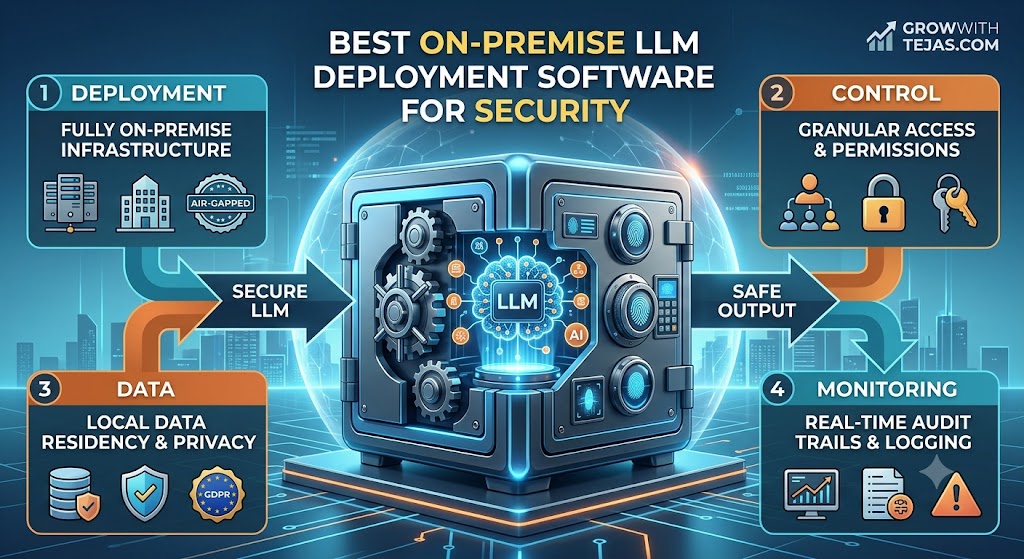
Best On-Premise LLM Deployment Software for Security
Artificial intelligence is becoming part of everyday business operations. Companies are using large language models (LLMs) to summarize documents, analyze internal data, assist employees, automate customer support, generate code, and build AI-powered applications.
But there is one major concern: data security.
Sending confidential company information, customer records, source code, financial documents, or intellectual property to an external AI service may not be acceptable for every organization.
That’s where on-premise LLM deployment software for security becomes important.
Instead of sending sensitive information to a third-party hosted model, organizations can deploy LLMs within infrastructure they control—such as private servers, dedicated data centers, private clouds, or isolated environments.
In this guide, we’ll explore the best on-premise LLM deployment software in 2026, how secure LLM deployment works, what features to look for, and how to choose the right platform for your organization.
What Is On-Premise LLM Deployment?
On-premise LLM deployment means running a large language model on computing infrastructure controlled by your organization rather than relying entirely on a public, externally hosted AI service.
Depending on the architecture, the model may run on:
- Company-owned servers
- Private data centers
- Dedicated GPU infrastructure
- Private cloud environments
- Virtual private clouds
- Kubernetes clusters
- Air-gapped systems
- Edge infrastructure
The goal is usually to gain greater control over data, infrastructure, access, security policies, and model behavior.
For example, imagine a legal company wants employees to use an AI assistant to search thousands of confidential contracts.
Sending every contract to an external model may conflict with the company’s security requirements.
With an on-premise setup, the organization could run an appropriate LLM internally and connect it to its private document repository.
Employees could then interact with the internal AI system while the company maintains greater control over where sensitive data is processed.
Why Businesses Deploy LLMs On-Premise
Cloud-based AI APIs are convenient, scalable, and often the fastest way to build an AI application.
So why would an organization take on the additional complexity of hosting an LLM itself?
There are several reasons.
1. Greater Data Control
Data control is one of the biggest reasons organizations consider private LLM deployments.
Sensitive prompts may contain:
- Customer information
- Employee information
- Financial records
- Internal documents
- Proprietary research
- Product roadmaps
- Source code
- Legal documents
- Trade secrets
Running models within controlled infrastructure can reduce the need to send this information outside the organization’s environment.
However, on-premise deployment does not automatically make an AI system secure.
Security still depends on authentication, authorization, encryption, network architecture, logging, patching, model configuration, and operational practices.
2. Compliance Requirements
Organizations operating in regulated industries often have strict requirements around how data is processed and stored.
Examples include:
- Healthcare
- Financial services
- Government
- Legal services
- Insurance
- Defense
- Enterprise SaaS
Private deployment can provide additional architectural control when organizations need to meet specific internal or regulatory requirements.
The appropriate architecture should still be reviewed by qualified security, privacy, and compliance teams.
3. Intellectual Property Protection
Companies increasingly want LLMs to work with highly valuable proprietary information.
For example:
A software company may want an AI coding assistant trained or grounded on private repositories.
A pharmaceutical organization may want AI to search internal research.
A manufacturing company may want employees to query confidential engineering documentation.
In these situations, controlling where data is processed can become an important architectural consideration.
4. Network Isolation
Some organizations operate systems that cannot freely communicate with the public internet.
These environments may require:
- Restricted networks
- Private networking
- Offline operation
- Air-gapped infrastructure
Certain self-hosted LLM architectures can operate without sending inference requests to external AI APIs.
This makes local deployment useful for environments where internet connectivity is limited or intentionally restricted.
5. Infrastructure Control
Self-hosting gives engineering teams more control over how models are deployed.
Organizations can potentially choose:
- Hardware
- GPUs
- Model versions
- Quantization
- Inference engines
- Scaling policies
- Logging
- Authentication
- Network rules
- Storage
- Monitoring
That flexibility can be valuable for companies with mature infrastructure teams.
Best On-Premise LLM Deployment Software for Security
There isn’t one platform that’s best for every organization.
Some tools focus on inference speed, while others provide model serving, Kubernetes orchestration, enterprise governance, or easy local deployment.
Here are several technologies worth evaluating.
1. NVIDIA AI Enterprise and NIM
Best for: Enterprises building GPU-powered private AI infrastructure
NVIDIA has become a major part of the infrastructure behind modern AI workloads.
NVIDIA NIM provides inference microservices designed to simplify the deployment of AI models, while NVIDIA AI Enterprise provides enterprise software and support around AI workloads.
Organizations with NVIDIA GPU infrastructure can use the ecosystem to build private AI environments.
Potential use cases include:
- Enterprise AI assistants
- Retrieval-augmented generation
- Internal knowledge systems
- Generative AI applications
- Domain-specific copilots
- AI agents
Why consider NVIDIA?
The biggest advantage is the broader hardware and software ecosystem.
Organizations already investing heavily in NVIDIA GPUs may prefer deployment technologies optimized around that infrastructure.
Security considerations
Enterprises should still configure:
- Network isolation
- Identity management
- Access controls
- Encryption
- Monitoring
- Container security
- Secrets management
The deployment platform is only one component of the overall security architecture.
Best suited for: Large enterprises with dedicated AI infrastructure and engineering teams.
2. Red Hat OpenShift AI
Best for: Enterprise Kubernetes environments
Red Hat OpenShift AI provides tools for developing, deploying, and managing AI and machine-learning workloads within the OpenShift ecosystem.
Organizations already running Red Hat OpenShift may find it attractive because AI workloads can operate within their existing container and Kubernetes infrastructure.
Potential benefits include:
- Centralized AI infrastructure
- Kubernetes-based deployment
- Model serving
- Enterprise administration
- Integration with existing infrastructure
- Support for AI development workflows
Why is this relevant for secure LLM deployment?
Large enterprises often don’t want AI to become a completely separate infrastructure environment.
Instead, they want AI workloads to follow established practices around identity, networking, containers, monitoring, and access.
OpenShift-based deployment can help organizations integrate LLM workloads into existing enterprise infrastructure.
Best suited for: Enterprises already using Kubernetes or Red Hat OpenShift.
3. vLLM
Best for: High-performance open-source LLM inference
vLLM is a popular open-source inference and serving engine for large language models.
It is particularly useful when organizations want to serve compatible models efficiently on their own infrastructure.
Developers can use vLLM as part of an internal AI stack and expose models through an API that applications can call.
Why developers use vLLM
Its focus is efficient LLM inference.
For organizations serving a significant number of requests, inference efficiency can affect:
- GPU utilization
- Throughput
- Latency
- Infrastructure requirements
- Cost per request
Security considerations
vLLM should not be treated as a complete enterprise security platform by itself.
Organizations deploying it should build appropriate security controls around the inference service, including authentication, authorization, network restrictions, monitoring, and rate limiting.
Best suited for: Technical teams that want a flexible, high-performance inference engine.
4. Hugging Face Text Generation Inference
Best for: Serving supported open models
Hugging Face is one of the best-known ecosystems for open machine learning and language models.
Text Generation Inference (TGI) is designed for deploying and serving large language models.
Organizations can use technologies within the Hugging Face ecosystem to build private model-serving infrastructure.
Potential advantages
The broader Hugging Face ecosystem provides access to:
- Models
- Libraries
- Developer tooling
- AI documentation
- Deployment resources
This can make experimentation easier for teams already using Hugging Face technologies.
Security warning
Downloading a model and running it internally does not automatically mean the model or deployment is safe.
Organizations should establish policies for:
- Approved models
- Model provenance
- Dependency scanning
- Container scanning
- Access control
- Model updates
- Vulnerability management
Best suited for: AI development teams working heavily with open models.
5. Ollama
Best for: Simple local LLM deployment and experimentation
Ollama has become popular among developers who want an easy way to run language models locally.
It can be useful for:
- Local AI experiments
- Development environments
- Internal prototypes
- Testing different models
- Building small private AI applications
The relatively straightforward developer experience makes it attractive for teams beginning to explore local LLMs.
Is Ollama suitable for enterprise production?
It depends on your requirements.
Ollama can be extremely useful for local development, but a large enterprise production deployment may require additional infrastructure for:
- Authentication
- High availability
- Horizontal scaling
- Centralized monitoring
- Governance
- Security controls
- Load balancing
Best suited for: Developers, small teams, prototypes, and local AI applications.
6. LocalAI
Best for: Self-hosted AI APIs
LocalAI is an open-source project designed to provide local AI capabilities through API interfaces.
It can be useful for organizations that want to run compatible AI models on infrastructure they control.
Potential use cases include:
- Internal chatbots
- AI-powered business applications
- Private document assistants
- Local inference APIs
- Development environments
Why consider LocalAI?
One advantage of an API-oriented approach is that existing applications can interact with internally hosted AI services without every application needing to manage the model directly.
This can simplify internal AI architecture.
Best suited for: Organizations wanting flexible, self-hosted AI APIs.
7. KServe
Best for: Kubernetes-native model serving
KServe provides Kubernetes-native capabilities for serving machine-learning models.
For organizations that already manage production workloads through Kubernetes, model-serving infrastructure can become part of the same broader operational environment.
This approach can be attractive when companies need:
- Scalable inference
- Container orchestration
- Deployment automation
- Resource management
- Production model serving
Why KServe matters for enterprises
Deploying an LLM is relatively easy.
Operating one reliably at scale is much harder.
Production systems need to handle failures, traffic spikes, deployments, monitoring, resource allocation, and infrastructure changes.
Kubernetes-native platforms can help engineering teams manage some of these operational challenges.
Best suited for: Organizations with strong Kubernetes and MLOps expertise.
8. Kubernetes
Best for: Building highly customized private LLM infrastructure
Kubernetes isn’t specifically an LLM platform.
However, it frequently becomes part of the infrastructure used to operate private AI workloads.
Organizations can combine Kubernetes with:
- GPU nodes
- vLLM
- KServe
- Model repositories
- API gateways
- Observability systems
- Secret-management platforms
- Identity systems
This creates a highly customizable architecture.
The downside
Flexibility creates complexity.
Running production LLM infrastructure on Kubernetes requires significant DevOps, platform-engineering, security, and machine-learning expertise.
Best suited for: Larger technical organizations requiring significant infrastructure control.
Comparison of On-Premise LLM Deployment Software
| Platform | Best For | Deployment Complexity | Typical User |
|---|---|---|---|
| NVIDIA AI Enterprise / NIM | Enterprise GPU AI | Medium–High | Large enterprises |
| Red Hat OpenShift AI | Enterprise Kubernetes AI | High | Enterprise IT teams |
| vLLM | Fast LLM inference | Medium | AI engineers |
| Hugging Face TGI | Open-model serving | Medium | ML teams |
| Ollama | Local deployment | Low | Developers |
| LocalAI | Self-hosted AI APIs | Low–Medium | Developers and SMBs |
| KServe | Kubernetes model serving | High | MLOps teams |
| Kubernetes | Custom AI infrastructure | High | Enterprise platform teams |
Deployment complexity is relative. The actual difficulty depends heavily on the organization’s infrastructure, scale, security requirements, and engineering expertise.
On-Premise LLM vs Cloud LLM: Which Is More Secure?
This question doesn’t have a simple answer.
People sometimes assume:
On-premise = secure
and
Cloud = insecure
That’s an oversimplification.
A poorly configured internal LLM server can be significantly less secure than a professionally managed cloud service.
The real comparison looks more like this:
| Factor | On-Premise LLM | Cloud LLM |
|---|---|---|
| Infrastructure control | High | Lower |
| Initial setup | More complex | Easier |
| Hardware responsibility | Organization | Provider |
| Scaling | Organization manages | Usually easier |
| Security configuration | Organization responsible | Shared/provider-dependent |
| Model flexibility | Often high | Provider-dependent |
| Offline deployment | Possible | Usually limited |
| Maintenance burden | Higher | Lower |
| Data-path control | Potentially high | Provider-dependent |
Therefore, the right question isn’t:
“Is on-premise more secure than cloud?”
A better question is:
“Which deployment architecture allows us to satisfy our specific security, privacy, operational, and compliance requirements?”
Security Features to Look for in On-Premise LLM Software
If security is your primary reason for self-hosting, evaluate much more than the model itself.
1. Authentication
Only authorized users and applications should be able to access the LLM.
Consider integration with existing identity systems and strong authentication mechanisms.
2. Role-Based Access Control
Not every employee should necessarily have access to every model or data source.
For example:
A general employee assistant shouldn’t automatically gain access to confidential HR documents.
Access should follow the principle of least privilege.
3. Encryption
Consider encryption for:
Data in transit: Communications between users, applications, model servers, vector databases, and other infrastructure.
Data at rest: Stored prompts, logs, documents, embeddings, model artifacts, and other sensitive information.
4. Audit Logging
Security teams need visibility into what happens inside the AI system.
Logs may need to capture information such as:
- Authentication events
- Administrative actions
- Model access
- Data-source access
- Configuration changes
- Security events
At the same time, logs themselves can contain sensitive information and should be protected accordingly.
5. Network Isolation
LLM services shouldn’t automatically be exposed to the public internet.
Organizations can use controls such as:
- Private networks
- Firewalls
- API gateways
- Network policies
- VPN access
- Restricted outbound connections
High-security environments may require stronger isolation.
6. Secrets Management
API keys, database credentials, certificates, and authentication tokens should not be hard-coded into applications or containers.
Use a proper secrets-management approach.
7. Model Governance
Organizations should know which models are allowed to run.
A model approval process might evaluate:
- Model source
- License
- Security risks
- Intended use
- Performance
- Known limitations
- Update process
8. Monitoring
Production LLM systems should be monitored for both infrastructure and application behavior.
Useful areas to monitor include:
- GPU utilization
- Latency
- Error rates
- Request volume
- Unusual access
- Resource consumption
- Model failures
Security Risks Specific to LLM Applications
Traditional infrastructure security is only part of the problem.
LLM applications introduce additional attack surfaces.
Prompt Injection
Prompt injection occurs when malicious or untrusted content attempts to manipulate an AI system’s instructions.
This becomes particularly important when an LLM can access external tools, internal documents, databases, or applications.
Organizations should not assume that a system prompt alone provides adequate security.
Excessive Permissions
An AI assistant should not receive unrestricted access simply because it operates internally.
For example, an employee chatbot that needs to search public company policies should not automatically have access to payroll information.
Sensitive Data Leakage
LLM applications can accidentally expose information through:
- Prompts
- Responses
- Logs
- Conversation history
- Retrieved documents
- Connected tools
Data-access policies should apply throughout the entire AI pipeline.
Insecure Model Supply Chain
Open models, containers, libraries, and dependencies come from different sources.
Organizations should treat AI infrastructure as part of their software supply chain and perform appropriate security checks.
Unsafe Tool Use
Modern LLMs increasingly interact with tools.
An AI agent might be able to:
- Query databases
- Create support tickets
- Send messages
- Execute workflows
- Modify records
These actions require strong authorization controls.
The model should never become a shortcut around existing security policies.
Secure On-Premise LLM Architecture
A simplified enterprise architecture might look like this:
Employee
↓
Identity Provider
↓
Internal AI Application
↓
API Gateway
↓
LLM Inference Server
↓
Approved Model
For a retrieval-augmented generation system, additional components may include:
Internal Documents
↓
Document Processing
↓
Embedding Model
↓
Vector Database
↓
Access-Controlled Retrieval
↓
LLM
↓
Employee
The critical phrase here is access-controlled retrieval.
A private LLM should not automatically gain access to every internal document.
If an employee isn’t permitted to read a document normally, asking the AI about that document shouldn’t bypass the restriction.
On-Premise LLMs and RAG
Retrieval-Augmented Generation (RAG) is one of the most common ways enterprises connect LLMs to private information.
Instead of retraining the model every time company information changes, the system retrieves relevant information when a user asks a question.
For example:
An employee asks:
What is our reimbursement policy for international travel?
The system can:
- Authenticate the employee.
- Search approved internal documents.
- Retrieve relevant sections.
- Provide that context to the LLM.
- Generate an answer.
- Return the answer to the employee.
This architecture can be useful for:
- Employee knowledge assistants
- Legal document search
- Technical documentation
- Customer-support knowledge bases
- Internal research
- Enterprise search
But RAG introduces its own security requirements.
The retrieval layer must enforce permissions rather than simply giving the LLM access to the entire knowledge base.
Hardware Requirements for Running LLMs On-Premise
Hardware requirements vary dramatically depending on the model.
Important factors include:
- Model parameter count
- Numerical precision
- Quantization
- Context length
- Number of concurrent users
- Tokens generated per second
- Latency requirements
- Batch size
Smaller quantized models may run on relatively modest hardware.
Large models serving hundreds or thousands of concurrent users may require multiple high-end GPUs and sophisticated distributed infrastructure.
Before purchasing hardware, benchmark the actual workload.
A proof of concept should measure:
- Tokens per second
- Time to first token
- GPU memory usage
- Concurrent request performance
- Model quality
- Infrastructure cost
Don’t choose hardware based only on model parameter count.
How to Choose On-Premise LLM Deployment Software
Use the following process before committing to a platform.
Step 1: Define Your Security Requirements
Document why you need private deployment.
Possible requirements include:
- Data cannot leave a particular environment
- Internet access must be restricted
- Specific data residency requirements
- Existing identity systems must be used
- Detailed audit logs are required
Without clear requirements, it’s difficult to evaluate platforms objectively.
Step 2: Select Your Models
Determine which models you need to support.
Consider:
- Model quality
- Licensing
- Hardware requirements
- Context window
- Language support
- Tool-calling requirements
- Quantization support
Avoid designing an infrastructure stack around a single model unless you’re certain that model will remain suitable.
Step 3: Estimate Usage
Ask:
- How many employees will use the system?
- How many requests will they generate?
- How long are typical prompts?
- How long are typical responses?
- How much concurrency should the system support?
These factors dramatically affect infrastructure requirements.
Step 4: Evaluate Security Controls
Review:
- Authentication
- Authorization
- Encryption
- Auditability
- Network isolation
- Secrets management
- Vulnerability management
- Model governance
Step 5: Test Performance
Run real workloads instead of relying solely on published benchmarks.
Your workload might behave very differently from a standardized benchmark.
Step 6: Calculate Total Cost of Ownership
Don’t compare only API pricing against GPU pricing.
On-premise costs may include:
- GPUs
- Servers
- Networking
- Storage
- Electricity
- Cooling
- Data-center costs
- Engineering
- Security
- Monitoring
- Maintenance
- Hardware replacement
A cloud API may be cheaper for some workloads.
Self-hosting may become attractive for others.
Who Should Consider On-Premise LLM Deployment?
On-premise LLM deployment can make sense for:
Financial organizations
Banks and financial institutions often work with highly sensitive customer and transaction information.
Healthcare organizations
AI applications may interact with confidential health-related data and operate under strict regulatory requirements.
Government agencies
Certain workloads may require restricted networks or isolated infrastructure.
Legal organizations
Law firms and legal departments may use AI to analyze confidential contracts, cases, and communications.
Technology companies
Software companies may want LLMs to interact with proprietary source code and internal engineering documentation.
Research organizations
Private deployment can help organizations maintain greater control over proprietary research and intellectual property.
When You Shouldn’t Self-Host an LLM
On-premise deployment isn’t always the right choice.
A managed AI service may be more practical when:
- Your organization has limited infrastructure expertise
- AI usage is relatively small
- Your workload changes dramatically
- You need rapid access to leading models
- You don’t have strict private-deployment requirements
- Maintaining GPU infrastructure would cost more than using an API
Self-hosting creates responsibility.
You become responsible for much more of the infrastructure, including availability, security, scaling, monitoring, and upgrades.
Don’t self-host simply because it sounds more secure.
Self-host because the architecture solves a specific business or security requirement.
Best On-Premise LLM Software by Use Case
For organizations wanting a simple starting point:
Ollama can be useful for local development and experimentation.
For teams wanting open-source, high-performance inference:
vLLM is worth evaluating.
For teams heavily invested in the Hugging Face ecosystem:
Hugging Face’s model-serving technologies may fit naturally into existing workflows.
For Kubernetes environments:
KServe can provide model-serving infrastructure within a Kubernetes architecture.
For Red Hat enterprise environments:
Red Hat OpenShift AI may provide a more integrated enterprise approach.
For large GPU-based enterprise deployments:
NVIDIA’s enterprise AI ecosystem is worth considering.
The correct platform ultimately depends on your infrastructure rather than a universal ranking.
Frequently Asked Questions
What is the best on-premise LLM deployment software?
There isn’t one best platform for every organization. vLLM is a strong option for high-performance model inference, Ollama is convenient for local experimentation, KServe can fit Kubernetes-based environments, while platforms from NVIDIA and Red Hat target more comprehensive enterprise deployments.
Can ChatGPT be deployed completely on-premise?
Organizations looking specifically for fully self-hosted models should evaluate the deployment options and terms offered by model providers as well as open-weight models that support private infrastructure. Product availability and deployment options can change, so organizations should verify current vendor documentation before making architecture decisions.
Is an on-premise LLM more secure?
Not automatically. On-premise infrastructure provides additional control, but security depends on how the system is configured and maintained. Poor authentication, excessive permissions, vulnerable dependencies, or exposed inference endpoints can make a self-hosted deployment insecure.
Can LLMs run without internet access?
Some self-hosted models and supporting software can operate in environments without continuous internet access once the required models, dependencies, and infrastructure are available locally. Organizations requiring true air-gapped deployment should verify every component’s offline requirements before implementation.
What is the easiest way to run an LLM locally?
For developers, tools such as Ollama are designed to simplify running supported models locally. Production enterprise environments usually require additional infrastructure for authentication, scaling, monitoring, security, and high availability.
What is the difference between self-hosted and on-premise LLMs?
The terms overlap but aren’t always identical.
Self-hosted generally means your organization operates the model rather than consuming a fully managed inference service.
On-premise traditionally means the infrastructure physically resides within an organization’s own facilities.
A self-hosted LLM can also run inside a private cloud or dedicated cloud environment, so it isn’t necessarily physically on-premise.
What is the best open-source LLM deployment software?
Popular technologies for self-managed LLM infrastructure include vLLM, KServe, LocalAI, Ollama, and model-serving technologies within the Hugging Face ecosystem. The best choice depends on whether your priority is inference performance, simplicity, Kubernetes integration, or broader production operations.
Final Thoughts
Choosing on-premise LLM deployment software for security is about much more than downloading an AI model and installing it on a private server.
A secure enterprise LLM environment requires several layers working together:
Model + inference engine + identity + permissions + networking + encryption + monitoring + governance.
For developers experimenting locally, a tool such as Ollama can provide a relatively simple starting point. Teams prioritizing inference performance can evaluate vLLM. Kubernetes-based organizations can consider KServe, while enterprises with established NVIDIA or Red Hat infrastructure may benefit from their respective AI platforms.
Most importantly, don’t assume that keeping a model inside your network automatically makes it secure.
Start by defining exactly what data you’re protecting, who should be allowed to access it, what the LLM should be allowed to do, and how every interaction will be monitored.
Then select the deployment software that supports those requirements.
For organizations handling sensitive data, that security-first approach is far more important than choosing whichever LLM platform happens to be the most popular.