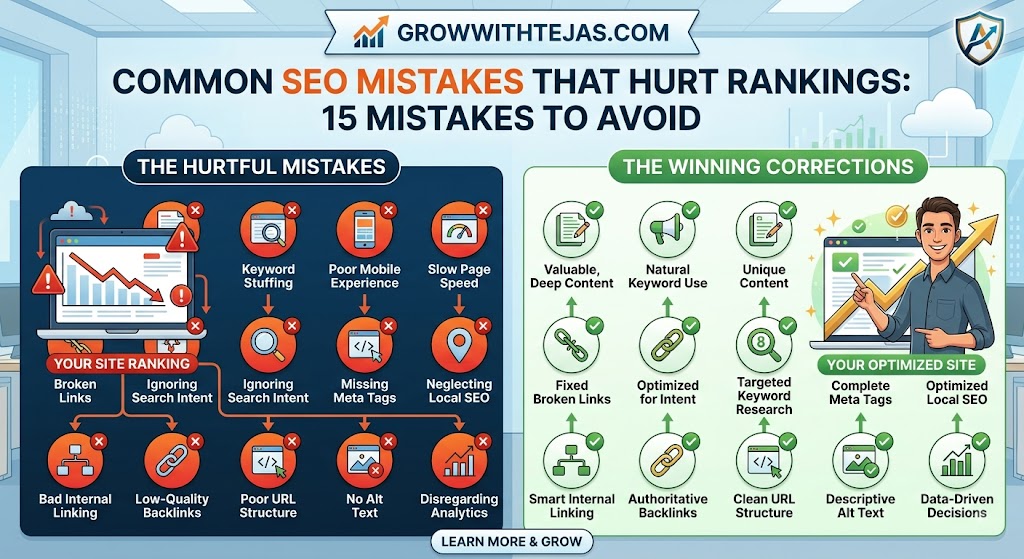
Common SEO Mistakes That Hurt Rankings: 15 Mistakes to Avoid
You publish a new article.
You optimize the title, add a few keywords, hit publish, and wait for Google traffic.
A few weeks pass.
Nothing happens.
So you publish more content, build a few backlinks, update some pages, and wait again.
Still no meaningful improvement.
The problem may not be that you’re doing too little SEO. Sometimes, SEO mistakes are quietly holding your website back.
A slow website, poor search intent alignment, keyword cannibalization, weak internal linking, duplicate content, or technical indexing issues can make it harder for your pages to rank—even when the content itself is good.
In this guide, we’ll look at the most common SEO mistakes that hurt rankings, why they matter, and how you can fix them.
Whether you run a blog, business website, affiliate site, SaaS website, or eCommerce store, these are mistakes worth checking.
Quick List: Common SEO Mistakes That Hurt Rankings
| SEO Mistake | Why It Hurts | Priority |
|---|---|---|
| Ignoring search intent | Your content doesn’t match what searchers want | High |
| Targeting the wrong keywords | You compete for irrelevant or unrealistic terms | High |
| Keyword stuffing | Makes content unnatural and low-quality | High |
| Publishing thin content | Provides little value to searchers | High |
| Weak title tags | Can hurt relevance and clicks | Medium |
| Poor internal linking | Makes important pages harder to discover | High |
| Keyword cannibalization | Multiple pages compete for similar searches | Medium |
| Slow page speed | Creates poor user experience | High |
| Not optimizing for mobile | Hurts usability for mobile visitors | High |
| Indexing problems | Google may not be able to index important pages | Critical |
| Duplicate content | Creates unnecessary competing URLs | Medium |
| Broken links | Creates poor UX and wastes crawl paths | Medium |
| Ignoring image SEO | Misses optimization and performance opportunities | Low-Medium |
| Buying low-quality backlinks | Can create unnecessary SEO risk | High |
| Never updating old content | Rankings can decline as content becomes outdated | Medium |
Let’s examine each mistake.
1. Ignoring Search Intent
This is one of the biggest SEO mistakes you can make.
You can write an excellent 5,000-word article, optimize it perfectly, and build backlinks to it.
But if it doesn’t satisfy search intent, ranking will be difficult.
Search intent simply means:
What does the person searching this keyword actually want?
For example, someone searching:
“how to do keyword research”
probably wants a tutorial.
Someone searching:
“best keyword research tools”
probably wants a comparison or list of tools.
And someone searching:
“Ahrefs pricing”
likely wants pricing information about a specific product.
These keywords are related, but the intent behind them is different.
How to fix it
Before creating a page, search your target keyword and study the pages already ranking.
Look at:
- The type of content ranking
- How detailed the pages are
- Common subtopics they cover
- Whether results are guides, product pages, category pages, or lists
- What questions searchers appear to want answered
Don’t blindly copy competitors.
Instead, understand why those pages satisfy the query and create something genuinely useful for the same searcher.
2. Targeting the Wrong Keywords
Not every keyword is worth targeting.
A common beginner SEO mistake is choosing keywords purely because they have high search volume.
Imagine you have a relatively new SEO blog.
You discover a keyword like:
“SEO”
It gets lots of searches.
Great keyword, right?
Not necessarily.
It is extremely broad, highly competitive, and the search intent may not align with a specific article you’re creating.
You might have a better chance targeting something more specific, such as:
“common SEO mistakes for small business websites”
Even if the keyword has lower search volume, the searcher is more specific—and the competition may be more realistic.
How to choose better keywords
Consider:
- Search intent
- Relevance to your website
- Competition
- Search volume
- Business value
- Your site’s topical authority
- Whether you can create something better than existing results
Don’t chase traffic for the sake of traffic.
100 relevant visitors can be more valuable than 10,000 visitors who have no interest in what you offer.
3. Keyword Stuffing
There was a time when repeating a keyword over and over could help with SEO.
That isn’t how you should write content today.
Consider this sentence:
If you’re looking for the best SEO tools, our best SEO tools guide covers the best SEO tools you need when choosing the best SEO tools.
Technically, the keyword appears several times.
Practically, it sounds terrible.
Keyword stuffing makes content unnatural, repetitive, and unpleasant to read.
What should you do instead?
Use your primary keyword naturally in important places such as:
- Page title
- H1
- Introduction when appropriate
- Relevant subheadings
- URL
- Meta description
- Body content
Then write naturally around the topic.
Use related terminology because it helps you explain the subject—not because you’re trying to hit an arbitrary keyword-density percentage.
There is no reason to force your exact keyword into every paragraph.
Write for the reader first.
4. Publishing Thin or Unhelpful Content
More pages don’t automatically mean more traffic.
Publishing 500 weak articles isn’t necessarily better than publishing 50 genuinely useful ones.
Thin content may include pages that:
- Barely answer the query
- Repeat information found everywhere else
- Contain unnecessary filler
- Exist primarily to target a keyword
- Provide no original insight or value
- Don’t satisfy the visitor’s intent
And simply increasing the word count isn’t the solution.
A 4,000-word article can still be thin in value.
Meanwhile, a 700-word article can perfectly answer a specific question.
How to improve content quality
Ask yourself:
After reading this page, does the visitor still need to return to Google to find the answer?
Try adding genuinely useful elements such as:
- Examples
- Screenshots
- Original experience
- Data
- Templates
- Comparisons
- Step-by-step instructions
- FAQs
- Pros and cons
- Practical recommendations
Don’t ask, “How can I make this article longer?”
Ask:
“How can I make this article more useful?”
5. Writing Weak Title Tags
Your title tag is one of the most important on-page SEO elements.
Yet many websites use titles such as:
Home
Services
Blog Post 24
Or they stuff every imaginable keyword into them.
A good title should clearly communicate what the page is about while encouraging the right searcher to click.
For example:
Bad:
SEO Mistakes SEO Errors SEO Problems SEO Tips
Better:
15 Common SEO Mistakes That Hurt Your Google Rankings
The second title is clearer, more natural, and communicates what the reader will get.
Title tag tips
Keep your titles:
- Descriptive
- Relevant to the page
- Natural
- Unique
- Focused on the primary topic
- Useful to searchers
Avoid creating multiple pages with identical or nearly identical titles.
6. Ignoring Internal Linking
Internal links are links between pages on your own website.
They’re incredibly useful—and frequently overlooked.
Suppose you publish an article about keyword research.
You already have related guides covering:
- SEO tools
- Search intent
- Long-tail keywords
- On-page SEO
- Competitor analysis
Linking these pages together helps visitors discover additional useful content and helps search engines understand relationships between pages.
Common internal linking mistakes
Avoid:
- Publishing pages with no internal links pointing to them
- Using vague anchor text everywhere
- Adding dozens of irrelevant links
- Linking only to your homepage
- Never revisiting older articles to link to new content
When you publish a new article, don’t only add links from the article.
Find relevant older pages and add links to the new article as well.
That small habit can make your content architecture significantly stronger.
7. Keyword Cannibalization
Imagine you publish these three articles:
- Best SEO Tools
- Top SEO Tools
- Best Tools for SEO
If all three pages target essentially the same intent, you may have created unnecessary competition between your own pages.
This is commonly called keyword cannibalization.
However, having multiple pages mention the same keyword doesn’t automatically mean cannibalization exists.
The real issue is when multiple URLs serve substantially the same search intent and compete where one stronger page would make more sense.
How to fix keyword cannibalization
Depending on the situation, you can:
- Merge overlapping articles
- Redirect weaker URLs
- Differentiate search intent
- Improve internal linking
- Re-optimize pages around distinct topics
- Consolidate duplicate information
Before creating a new article, search your own website.
You may already have a page targeting the same intent.
8. Having a Slow Website
Nobody likes waiting for a webpage to load.
A slow website can hurt the user experience, increase frustration, and make browsing your website unnecessarily difficult.
Common causes include:
- Huge images
- Poor hosting
- Excessive JavaScript
- Too many third-party scripts
- Heavy themes
- Too many plugins
- Poor caching
- Unoptimized fonts
How to improve website speed
Start with the biggest problems rather than obsessing over tiny optimizations.
Consider:
- Compressing images.
- Using modern image formats where appropriate.
- Removing unnecessary plugins.
- Reducing unnecessary scripts.
- Implementing caching.
- Using reliable hosting.
- Testing Core Web Vitals.
- Using a CDN when appropriate.
Google PageSpeed Insights can help identify performance issues, but don’t become obsessed with getting a perfect score.
The goal is a fast, usable website for real visitors.
9. Ignoring Mobile SEO
Your website might look fantastic on your laptop.
But what happens when someone opens it on a smartphone?
Check whether:
- Text is readable
- Buttons are easy to tap
- Navigation works properly
- Images fit the screen
- Pop-ups don’t cover everything
- Forms are usable
- Tables work on smaller displays
- Pages load quickly
A surprising number of website owners spend hours designing desktop pages without properly testing the mobile experience.
How to check your site
Don’t only resize your desktop browser.
Open important pages on an actual smartphone and use them.
Try:
- Navigating the menu
- Clicking CTAs
- Filling out forms
- Reading articles
- Making a purchase if applicable
- Opening images
- Using search
You’ll often discover problems you didn’t notice on desktop.
10. Accidentally Blocking Google From Indexing Your Pages
This mistake can destroy your SEO performance regardless of how good your content is.
If Google cannot properly crawl or index a page, that page cannot perform normally in search results.
Common problems include:
- Accidental
noindextags - Incorrect robots.txt rules
- Redirect mistakes
- Canonicalization errors
- Pages returning server errors
- Important pages being inaccessible through internal links
This sometimes happens after a website redesign or migration.
A staging website may intentionally be blocked from search engines, but those restrictions accidentally remain when the new website goes live.
How to check indexing problems
Use Google Search Console.
Check:
- Page indexing reports
- URL Inspection
- Sitemap status
- Crawl-related issues
- Manual actions
- Security issues
If an important page isn’t appearing in Google, don’t immediately assume you need more backlinks.
First make sure Google can actually access and index it.
11. Duplicate Content and URL Problems
Duplicate content doesn’t always mean someone copied your article.
Sometimes your own website creates multiple URLs containing substantially the same content.
For example, different versions of a page may be accessible through:
- Parameters
- Filters
- HTTP and HTTPS configurations
- WWW and non-WWW versions
- Category/tag archives
- Tracking parameters
- Printer-friendly pages
Large eCommerce websites are especially susceptible to URL duplication because filters and product variations can create huge numbers of URLs.
How to handle duplicate URLs
Depending on the cause, solutions may involve:
- Canonical tags
- Redirects
- Consistent internal linking
- URL parameter management
- Better site architecture
- Consolidating duplicate pages
Don’t randomly delete pages simply because they look similar.
Understand why the duplicate URLs exist first.
12. Ignoring Broken Links
Broken links create dead ends.
A visitor clicks something expecting useful information and gets a 404 page instead.
One broken link isn’t likely to destroy your rankings, but a website filled with outdated internal links creates a poor experience and can make your site harder to navigate.
Broken links commonly appear when:
- Pages are deleted
- URLs are changed
- Website structures are redesigned
- External websites remove content
- Articles haven’t been updated for years
How to fix broken links
Regularly crawl your website and look for:
- Broken internal links
- Broken external links
- Incorrect redirects
- Redirect chains
- Important 404 pages
For an internal URL that has moved, update the link to point directly to the correct destination.
If you’ve permanently moved a valuable page, consider implementing an appropriate redirect.
13. Ignoring Image SEO
Images can improve your content.
They can also make pages painfully slow when handled badly.
One of the most common mistakes is uploading a massive image straight from a camera or design tool and displaying it at a fraction of its original size.
Basic image SEO checklist
Before uploading an image:
- Resize it appropriately
- Compress the file
- Choose an appropriate file format
- Use a descriptive filename when useful
- Add meaningful alt text when the image requires it
- Avoid stuffing keywords into alt text
- Consider lazy loading where appropriate
Alt text primarily helps describe meaningful images for accessibility.
Don’t turn it into a place to dump keywords.
For example:
Bad alt text:
best-seo-tools-best-seo-software-seo-tools-2026
Better:
Dashboard showing keyword ranking changes
Describe the image naturally when a description is appropriate.
14. Buying Low-Quality Backlinks
Backlinks remain an important part of SEO, which is exactly why there is a massive industry selling them.
You’ll probably receive emails promising things such as:
“50 DA 90+ backlinks for $20!”
Be careful.
Metrics such as DA and DR are third-party metrics. They are not Google’s ranking scores.
A website can have an impressive-looking third-party metric while providing little genuine SEO value.
Worse, manipulative link-building schemes can create unnecessary risk.
Focus on earning better links
Good link-building opportunities often come from:
- Original research
- Useful free tools
- Statistics
- Unique data
- Digital PR
- Expert contributions
- Partnerships
- Genuinely useful resources
- Relevant industry websites
Ten relevant, editorially earned links can be far more valuable than hundreds of random links from websites created primarily to sell backlinks.
15. Never Updating Old Content
Publishing an article isn’t the end of SEO.
Information changes.
Products disappear.
Statistics become outdated.
Screenshots stop matching the software.
Links break.
Competitors publish better resources.
And search intent can evolve.
If an article performed well two years ago but is gradually losing traffic, updating it may be more valuable than immediately publishing another new article.
What should you update?
Review:
- Outdated statistics
- Old screenshots
- Broken links
- Discontinued products
- Pricing information
- Dates
- Recommendations
- Missing subtopics
- Search intent
- Titles and descriptions
- Internal links
But don’t change the publication date just to make old content look new.
Make meaningful improvements.
Bonus Mistake: Focusing on Google Instead of the Reader
This mistake connects almost everything else in this article.
Many website owners ask:
“What does Google want?”
A better starting question is:
“What does the person searching Google want?”
Think about the difference.
One mindset leads to:
- Keyword stuffing
- Artificial word counts
- Generic AI content
- Manipulative links
- Unnecessary SEO tricks
The other leads to:
- Clear answers
- Better examples
- Useful tools
- Original insights
- Fast pages
- Good navigation
- Helpful internal links
- Better user experiences
SEO matters.
But SEO works best when optimization helps search engines understand genuinely useful content rather than attempting to compensate for weak content.
How to Find SEO Mistakes on Your Website
You don’t need to randomly change things and hope rankings improve.
Perform a basic SEO audit.
Start with these areas.
Step 1: Check Google Search Console
Look for:
- Indexing issues
- Sitemap problems
- Significant traffic declines
- Queries losing clicks
- Pages losing impressions
- Manual actions
- Core Web Vitals issues
Search Console should be one of the first places you investigate when organic performance changes.
Step 2: Crawl Your Website
Use an SEO crawler to identify technical issues such as:
- Broken links
- Missing titles
- Duplicate titles
- Redirect chains
- Canonical issues
- Large images
- Missing headings
- Orphan pages
Step 3: Review Your Highest-Value Pages
Don’t try to optimize 1,000 pages simultaneously.
Start with pages that:
- Already receive organic traffic
- Rank on page two
- Generate leads or sales
- Have recently lost traffic
- Target strategically important keywords
Improving a page ranking #11 can sometimes provide a better return than trying to rank a brand-new page from scratch.
Step 4: Compare Search Intent
Search the primary query for each important page.
Ask:
Does my page still match what Google is showing searchers?
If the SERP is dominated by product pages and you have an informational blog post, there may be an intent mismatch.
Step 5: Review Internal Links
Find your most important pages.
Then ask:
How many relevant pages on my website link to them?
If important pages are buried several clicks deep with almost no internal links, improve their visibility within your site architecture.
SEO Mistakes Checklist
Use this quick checklist when auditing your website:
- Important pages are crawlable and indexable
- Each page targets a clear search intent
- Keywords are used naturally
- Content provides substantial value
- Title tags are descriptive and unique
- Important pages receive relevant internal links
- Multiple pages aren’t unnecessarily competing for the same intent
- Pages load quickly
- Website works properly on mobile
- Canonical tags are configured appropriately
- Broken internal links are fixed
- Images are optimized
- Backlink strategies aren’t based on spam
- Old content is periodically reviewed
- Google Search Console is regularly monitored
Which SEO Mistakes Should You Fix First?
If your website has dozens of problems, don’t try to fix everything simultaneously.
Prioritize issues based on potential impact.
Priority 1: Crawling and indexing
Fix anything preventing search engines from accessing important content.
Examples:
- Accidental noindex
- Robots.txt blocks
- Server errors
- Broken redirects
There’s little point optimizing a page Google cannot properly access.
Priority 2: Search intent and content
Next, determine whether your important pages actually satisfy their target queries.
Fix:
- Intent mismatch
- Thin content
- Keyword cannibalization
- Outdated information
Priority 3: Site architecture and internal linking
Make your important pages easy to discover.
Improve:
- Internal links
- Navigation
- Orphan pages
- Category structures
Priority 4: Performance and UX
Then work on:
- Page speed
- Mobile usability
- Intrusive pop-ups
- Broken links
- Image optimization
Priority 5: Authority
Once the foundations are solid, invest more heavily in earning relevant links and building topical authority.
Don’t spend months building backlinks to a page with serious technical or content problems.
How Long Does It Take to Recover After Fixing SEO Mistakes?
There is no universal timeline.
It depends on:
- The mistake
- Size of the website
- Crawl frequency
- Competition
- Quality of the fixes
- Website authority
- How long the issue existed
- Whether rankings declined for other reasons
A technical indexing problem may improve after affected URLs are recrawled and reprocessed.
A content problem might take longer.
And if your competitors simply have substantially better pages, fixing a few technical errors may not suddenly move you to position #1.
Avoid treating every SEO change as:
“I fixed it Monday. Why am I not ranking Tuesday?”
SEO usually requires patience, measurement, and iteration.
Final Thoughts
Most websites don’t have one magical SEO problem preventing them from ranking.
It’s usually a collection of smaller issues.
Maybe the content doesn’t completely satisfy search intent.
Important pages aren’t internally linked.
Old articles haven’t been updated.
Images are unnecessarily large.
Several pages compete for the same topic.
Or technical problems make certain URLs difficult to crawl and index.
The solution isn’t searching for another secret SEO hack.
Start with the fundamentals:
Make your website crawlable.
Create genuinely useful content.
Match search intent.
Build a logical website structure.
Make pages fast and easy to use.
Earn relevant authority.
And regularly review what is and isn’t working.
Fixing common SEO mistakes won’t guarantee the #1 position for every keyword.
But removing the problems that hold your website back gives your best content a much better chance to perform.
Frequently Asked Questions
What are the most common SEO mistakes?
Some of the most common SEO mistakes include ignoring search intent, targeting inappropriate keywords, keyword stuffing, publishing thin content, poor internal linking, keyword cannibalization, slow page speed, mobile usability problems, indexing errors, duplicate content, and low-quality link building.
What SEO mistakes can hurt Google rankings?
Technical issues that prevent crawling or indexing can have a major impact. Poor search intent alignment, weak content, bad site architecture, spammy link building, and poor user experience can also make it more difficult for a website to perform well in organic search.
Is keyword stuffing bad for SEO?
Yes. Keywords should be incorporated naturally where they help describe the page. Repeating keywords unnaturally to manipulate rankings can make content difficult to read and is not a good modern SEO practice.
Does duplicate content hurt SEO?
Duplicate or substantially similar URLs can create crawling, indexing, and canonicalization problems, especially on larger websites. Duplicate content doesn’t automatically mean a website will receive a penalty, but unnecessary duplication should still be managed properly.
Can broken links hurt SEO?
A few broken links are unlikely to destroy a website’s rankings, but large numbers of broken internal links can create poor user experiences and make website navigation and crawling less efficient.
Does website speed affect SEO?
Page experience and performance matter, but speed should not be treated as the only ranking factor. Focus on creating pages that load quickly and provide a good experience rather than chasing a perfect performance score.
How often should I perform an SEO audit?
The appropriate frequency depends on the website. A small blog may perform comprehensive audits periodically, while a large eCommerce or publishing website may need ongoing technical monitoring. Google Search Console should be checked regularly regardless of website size.
Can I fix SEO mistakes myself?
Yes. Many issues—including titles, internal linking, content updates, image optimization, and basic Search Console problems—can be fixed without an agency. More complex problems involving migrations, JavaScript rendering, server configurations, or large-scale indexing may require technical SEO expertise.
Common SEO Mistakes That Hurt Rankings
Recommended Fix Priority
- Technical indexing issues
- Content
- Internal linking
- Performance
- Authority