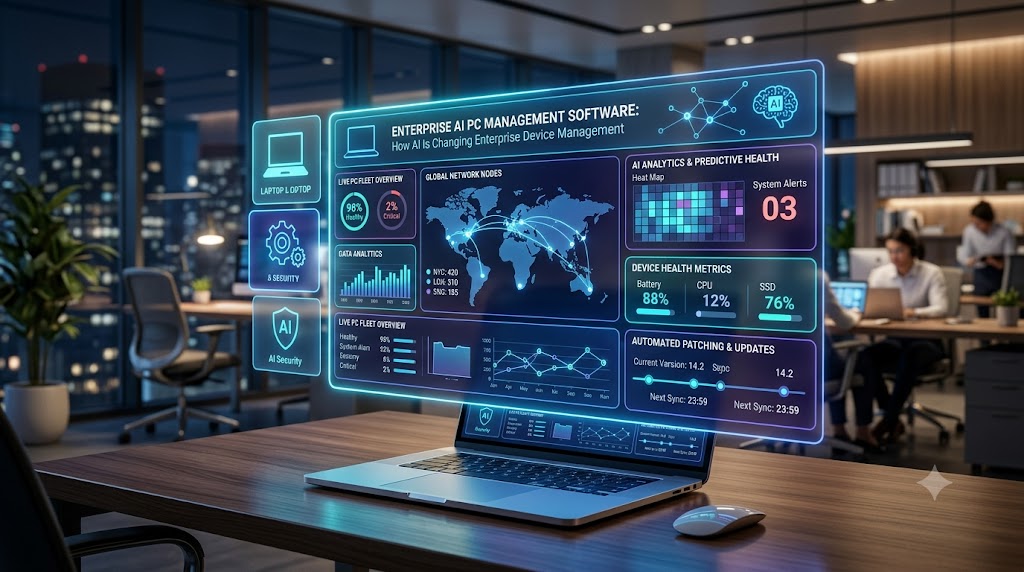
Enterprise AI PC Management Software
Enterprise IT teams are managing more endpoints than ever.
Laptops, desktops, remote workstations, AI PCs, and other employee devices are distributed across offices, homes, and countries. At the same time, IT teams are expected to maintain security, performance, compliance, and employee productivity—often without significantly increasing headcount.
This is where Enterprise AI PC management software is becoming increasingly relevant.
Instead of relying entirely on manual monitoring, predefined policies, and reactive troubleshooting, AI-powered PC management platforms can help IT teams analyze endpoint data, identify unusual behavior, automate routine tasks, and potentially resolve problems before they become widespread.
In this guide, we’ll explore what Enterprise AI PC management software is, how it works, its key capabilities, benefits, use cases, and what businesses should consider when choosing a solution.
What Is Enterprise AI PC Management Software?
Enterprise AI PC management software is a platform that uses artificial intelligence, automation, and endpoint data to help organizations monitor, secure, maintain, and optimize large fleets of business computers.
Traditional PC management software generally allows IT administrators to perform tasks such as:
- Device inventory management
- Software deployment
- Patch management
- Configuration management
- Remote troubleshooting
- Security policy enforcement
- Performance monitoring
AI introduces another layer of intelligence.
Rather than simply displaying device information or executing predefined commands, AI-powered systems can analyze large amounts of endpoint telemetry to identify patterns, prioritize issues, recommend actions, and automate repetitive workflows.
For an organization managing thousands of computers, that can significantly change how endpoint operations are handled.
Why Enterprises Need Smarter PC Management
Managing 20 computers is relatively straightforward.
Managing 20,000 computers across different offices, networks, operating systems, and employee environments is an entirely different challenge.
Enterprise IT teams commonly deal with issues such as slow computers, application crashes, outdated software, failed patches, security vulnerabilities, configuration drift, storage problems, battery degradation, and network connectivity issues.
Individually, many of these problems appear small.
At enterprise scale, however, they can generate thousands of support tickets and consume a significant amount of IT resources.
Traditional endpoint management platforms help centralize administration, but administrators may still need to determine:
- What is happening?
- Which devices are affected?
- How serious is the issue?
- What caused it?
- What action should be taken?
Enterprise AI PC management software aims to shorten this process by using AI to assist with analysis and remediation.
How Enterprise AI PC Management Software Works
Most AI-powered endpoint management platforms combine several technologies.
1. Endpoint Data Collection
Software agents or operating-system integrations collect information from enterprise PCs.
Depending on the platform, this may include:
- CPU utilization
- Memory usage
- Disk capacity
- Application performance
- System crashes
- Operating system versions
- Patch status
- Network performance
- Security events
- Device health information
This creates a large dataset describing the health and behavior of the organization’s endpoint environment.
2. AI-Powered Analysis
Machine learning models and analytical systems can process endpoint data to identify patterns that would be difficult for administrators to detect manually.
For example, a platform may identify that a particular application update correlates with increased memory consumption across hundreds of devices.
Instead of investigating each complaint individually, IT teams can identify a common cause.
3. Issue Prioritization
Not every endpoint problem deserves the same level of attention.
AI can help classify and prioritize issues based on factors such as:
- Number of affected users
- Business impact
- Security risk
- Device criticality
- Historical patterns
This helps IT teams focus on problems with the greatest potential impact.
4. Automated Remediation
Once an issue is identified, automation can execute predefined remediation workflows.
Examples might include:
- Restarting a service
- Removing temporary files
- Updating an application
- Changing a configuration
- Deploying a patch
- Reinstalling problematic software
Depending on company policy, remediation may happen automatically or require administrator approval.
5. Continuous Learning and Optimization
As more endpoint data becomes available, AI systems can potentially improve their ability to recognize recurring patterns.
This moves enterprise PC management toward a more proactive model.
Instead of:
Problem → Employee complaint → Support ticket → Investigation → Fix
organizations can work toward:
Detection → Analysis → Automated remediation → Problem prevented
Key Features of Enterprise AI PC Management Software
When evaluating an Enterprise AI PC management platform, several capabilities are particularly important.
Intelligent Device Monitoring
Administrators need visibility into the health of enterprise computers.
AI-powered monitoring can help identify abnormal device behavior instead of forcing IT teams to manually review thousands of metrics.
Predictive Analytics
Predictive analytics attempts to identify potential problems before they become serious.
For example, unusual disk behavior, increasing application crashes, or deteriorating system performance may indicate that a device is likely to experience problems.
Early detection gives IT teams an opportunity to intervene.
Automated Troubleshooting
Many IT support requests involve repetitive problems.
AI-assisted automation can help diagnose common issues and execute approved remediation actions without requiring an administrator to manually troubleshoot every device.
Natural Language IT Operations
Generative AI is also changing how administrators interact with management platforms.
Instead of navigating multiple dashboards and filters, an administrator may be able to ask questions such as:
“Which devices experienced repeated application crashes this week?”
or:
“Show computers with low disk space and missing critical updates.”
Natural-language interfaces can make complex endpoint datasets easier to explore.
Patch and Software Management
Keeping applications and operating systems updated remains one of the most important enterprise endpoint management responsibilities.
AI can potentially help organizations prioritize patches by considering device exposure, vulnerabilities, application dependencies, and business impact.
Endpoint Security
PC management and endpoint security increasingly overlap.
AI-powered platforms can help identify suspicious behavior, configuration problems, unusual processes, or devices that fall outside organizational security policies.
Digital Employee Experience Monitoring
Not every IT problem generates a support ticket.
Employees may tolerate slow startup times, application delays, poor Wi-Fi performance, or frequent crashes without contacting IT.
Digital Employee Experience (DEX) monitoring helps organizations identify these problems through endpoint telemetry.
AI can then help determine which problems are affecting the largest number of employees.
Benefits of AI-Powered Enterprise PC Management
Reduced IT Workload
Automation can eliminate many repetitive administrative tasks.
Instead of manually investigating hundreds of similar endpoint problems, administrators can create automated workflows that detect and remediate common issues.
Faster Problem Resolution
AI-assisted analysis can reduce the amount of time required to identify the root cause of endpoint problems.
This can improve metrics such as Mean Time to Resolution (MTTR).
Proactive IT Support
Traditional IT support is largely reactive.
Something breaks, an employee reports it, and IT responds.
AI-powered monitoring can help organizations detect issues before employees create tickets.
Better Employee Productivity
A slow computer might waste only a few minutes each day for one employee.
Across thousands of employees, however, those minutes can become a significant productivity cost.
Improving endpoint performance can therefore have an organization-wide impact.
Improved Endpoint Visibility
Large enterprises often struggle to maintain an accurate understanding of their device environment.
Centralized telemetry combined with AI-driven analysis can help administrators understand device health, software usage, performance issues, and compliance status.
More Scalable IT Operations
As companies grow, endpoint fleets grow as well.
Without automation, IT staffing requirements may increase alongside the number of devices.
AI-powered management can help organizations manage larger endpoint environments without increasing manual work at the same rate.
Common Enterprise AI PC Management Use Cases
Enterprise AI PC management software can support several practical IT scenarios.
Detecting Slow PCs
AI can analyze device performance data to identify computers experiencing persistent CPU, memory, storage, or application problems.
IT teams can then investigate or automatically remediate common causes.
Preventing Disk Space Problems
Low storage can cause application failures, poor performance, and operating system problems.
Automated workflows can identify devices approaching storage limits and perform approved cleanup actions.
Identifying Problematic Software Updates
A software update might work correctly on most devices while causing crashes on a particular hardware configuration.
AI-assisted analytics can help detect correlations between updates and device problems.
Reducing Help Desk Tickets
If an organization receives hundreds of tickets for the same recurring problem, automation may be able to resolve the issue before users need to contact support.
Managing Remote Employees
Remote work makes traditional hands-on IT troubleshooting difficult.
Cloud-based enterprise PC management allows administrators to monitor and manage devices regardless of whether employees are working from headquarters, a branch office, or home.
Improving Device Lifecycle Decisions
Endpoint data can also help businesses determine when hardware should be repaired, upgraded, reassigned, or replaced.
Instead of replacing devices solely according to age, organizations can consider actual device health and performance.
Enterprise AI PC Management vs. Traditional Endpoint Management
Traditional endpoint management isn’t disappearing.
AI is increasingly becoming an additional intelligence layer within endpoint management.
| Traditional PC Management | AI-Powered PC Management |
|---|---|
| Rule-based monitoring | Pattern-based analysis |
| Manual troubleshooting | AI-assisted diagnosis |
| Reactive support | More proactive detection |
| Static dashboards | Intelligent insights |
| Manual remediation | Automated workflows |
| Administrator queries and filters | Natural-language interaction |
| Scheduled maintenance | Data-driven optimization |
The biggest difference is therefore not simply automation.
It is the ability to turn large amounts of endpoint data into actionable information.
AI PCs Add Another Dimension
The growth of AI PCs may make enterprise endpoint management even more complex.
AI PCs typically include hardware designed to accelerate AI workloads locally, such as Neural Processing Units (NPUs).
For enterprises, this creates new management considerations.
IT departments may eventually need visibility into:
- AI-capable hardware
- NPU availability and utilization
- Local AI applications
- AI model deployment
- Application compatibility
- Device performance
- AI workload policies
- Data security and privacy
As organizations deploy more AI-capable devices, PC management platforms may evolve from simply managing hardware and software toward managing AI workloads running directly on endpoints.
That could make Enterprise AI PC management software an increasingly important component of enterprise AI infrastructure.
What to Look for When Choosing Enterprise AI PC Management Software
Not every platform marketed as “AI-powered” provides the same capabilities.
Organizations should evaluate products based on their actual operational requirements.
Key considerations include:
Device and OS Support
Check whether the platform supports your existing endpoint environment, including Windows, macOS, Linux, virtual desktops, and other relevant device types.
Integration Capabilities
Enterprise endpoint management rarely operates independently.
Look for integrations with your existing:
- IT service management platform
- Identity infrastructure
- Security tools
- Endpoint management systems
- Collaboration tools
- Reporting platforms
Automation Controls
Automation should include appropriate governance.
Administrators should be able to determine which actions can run automatically and which require human approval.
Security and Privacy
Endpoint platforms can collect significant amounts of device telemetry.
Organizations should understand what information is collected, where it is processed, how long it is retained, and which administrators can access it.
Explainability
AI recommendations are more useful when administrators can understand why an issue was flagged.
Platforms should provide enough context for IT teams to validate recommendations before implementing significant changes.
Scalability
A platform that works well with 500 devices may behave differently when managing 50,000.
Enterprises should evaluate performance, automation limits, reporting capabilities, and administrative controls at their expected scale.
Measurable ROI
AI features should solve real operational problems.
Useful metrics can include:
- Reduction in support tickets
- Lower Mean Time to Resolution
- Fewer device performance incidents
- Improved patch compliance
- Reduced manual IT workload
- Improved employee experience scores
These metrics make it easier to determine whether the platform is actually creating business value.
Challenges Businesses Should Consider
AI does not automatically make endpoint management perfect.
There are several challenges organizations should consider.
Data quality: AI insights depend heavily on the quality and completeness of endpoint telemetry.
False positives: Automated systems may occasionally identify normal behavior as problematic.
Automation risk: Incorrect remediation across thousands of devices could create a larger problem than the original issue.
Integration complexity: Enterprises often operate multiple IT management and security platforms.
Governance: Organizations need policies determining when AI can recommend actions and when it can execute them.
For this reason, human oversight remains important—particularly for high-impact changes.
The Future of Enterprise PC Management
Enterprise endpoint management is moving toward greater automation and intelligence.
Over the next several years, we can expect platforms to become increasingly capable of understanding device environments, identifying root causes, recommending fixes, and executing routine remediation.
Generative AI may also change the administrator experience.
Instead of spending significant time navigating dashboards, writing scripts, and building complex queries, IT administrators may increasingly describe what they want in natural language.
For example:
“Find devices experiencing abnormal battery degradation and identify the most likely causes.”
The system could analyze endpoint telemetry, identify affected devices, explain potential causes, and recommend remediation.
The IT administrator’s role therefore doesn’t disappear.
It shifts toward policy, governance, automation design, security, and higher-level decision-making.
Final Thoughts
Enterprise AI PC management software represents the convergence of endpoint management, automation, analytics, and artificial intelligence.
For organizations managing thousands of computers, its biggest advantage isn’t simply having “AI” attached to another IT product.
The real value comes from reducing the amount of manual work required to understand and maintain complex endpoint environments.
AI-powered PC management can help enterprises move from reactive troubleshooting toward proactive operations—detecting problems earlier, automating repetitive fixes, improving device performance, and giving IT teams better visibility into their endpoint infrastructure.
And as AI PCs become more common in enterprise environments, endpoint management may expand beyond traditional device administration to include local AI hardware, applications, models, and workloads.
Businesses evaluating these platforms should therefore focus less on AI marketing claims and more on measurable outcomes:
Does the software reduce IT workload? Does it improve endpoint reliability? Does it strengthen security? And does it provide a better experience for employees?
Those questions will ultimately determine whether an Enterprise AI PC management platform delivers meaningful value.