How to Write SEO-Friendly Blog Posts That Rank on Google
Creating great content is only half the job. If people can’t find your article on Google, your hard work may go unnoticed.
Learning how to write SEO-friendly blog posts helps you attract organic traffic, improve your search rankings, and grow your website consistently without paying for ads.
In this beginner-friendly guide, you’ll learn practical SEO writing techniques that work in 2026.
What Is an SEO-Friendly Blog Post?
An SEO-friendly blog post is an article optimized for both:
- Search engines like Google
- Human readers
A well-optimized article answers users’ questions while making it easy for search engines to understand the topic.
The goal is simple:
- Rank higher
- Get more clicks
- Increase organic traffic
- Improve user experience
Why SEO Writing Matters
Benefits include:
- Higher Google rankings
- More website visitors
- Increased authority
- Better engagement
- More leads and sales
- Long-term free traffic
Unlike paid ads, SEO traffic continues bringing visitors long after you publish your article.
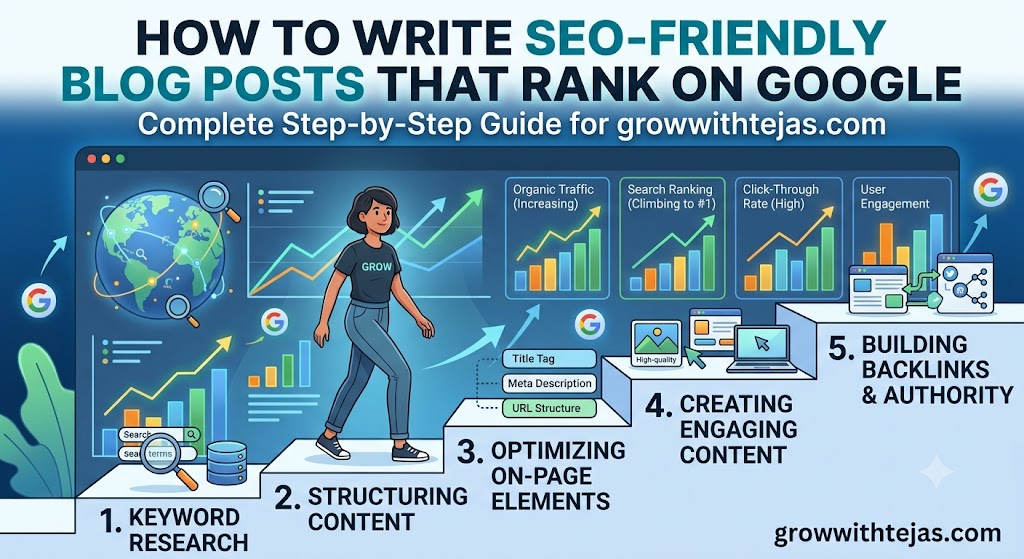
Step 1: Choose the Right Keyword
Every blog post should focus on one primary keyword.
Example:
Primary keyword:
How to Write SEO-Friendly Blog Posts
Supporting keywords:
- SEO blog writing
- SEO content writing
- Blog SEO tips
- On-page SEO
- SEO article writing
- Write blogs for Google
- SEO writing guide
Use keyword research tools like:
- Google Keyword Planner
- Google Search Console
- Google Trends
- Ubersuggest
- Ahrefs
- SEMrush
Step 2: Understand Search Intent
Before writing, ask:
What does the reader actually want?
If someone searches:
“How to Write SEO-Friendly Blog Posts”
They likely want:
- Step-by-step guide
- Practical tips
- Examples
- Common mistakes
- SEO checklist
Always satisfy search intent before trying to impress Google.
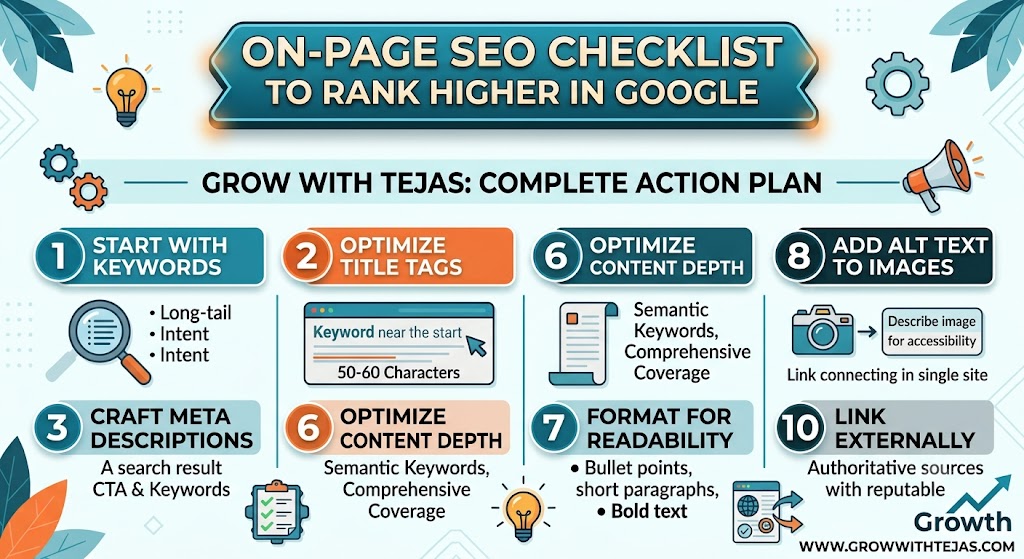
Step 3: Write an Attention-Grabbing Title
Your title should:
- Include the main keyword
- Promise value
- Be easy to read
Examples:
- How to Write SEO-Friendly Blog Posts That Rank
- SEO Blog Writing Guide for Beginners
- 15 SEO Writing Tips to Rank Higher on Google
Keep titles around 50–60 characters when possible.
Step 4: Write a Strong Introduction
Your introduction should:
- Explain the problem
- Mention the keyword naturally
- Tell readers what they’ll learn
Example:
If your blog posts aren’t getting Google traffic, your writing may not be optimized for SEO. This guide explains exactly how to write SEO-friendly blog posts that attract visitors and rank higher in search results.
Step 5: Use Proper Heading Structure
Organize your content using:
- H1 (Title)
- H2 (Main sections)
- H3 (Subtopics)
- H4 (Optional details)
Example:
H1
How to Write SEO-Friendly Blog Posts

H2
Choose Keywords

H2
Optimize Headlines

H2
Improve Readability

H2
Internal Linking

H2
SEO Checklist
Headings make content easier to scan.
Step 6: Write High-Quality Content
Google rewards content that is:
- Helpful
- Accurate
- Original
- Comprehensive
- Easy to understand
Avoid:
- Keyword stuffing
- Thin content
- AI-generated text without editing
- Duplicate content
Aim to solve the reader’s problem completely.
Step 7: Naturally Use Your Keywords
Include your primary keyword in:
- Title
- URL
- First paragraph
- One or two headings
- Meta description
- Image alt text
- Conclusion
Don’t force keywords.
Write naturally.
Step 8: Optimize Images
Images improve user experience.
Best practices:
- Compress images
- Use descriptive file names
- Add ALT text
- Use WebP format
- Include diagrams or screenshots where helpful
Example ALT text:
“How to write SEO-friendly blog posts checklist”
Step 9: Add Internal Links
Link to other relevant articles on your website.
Example:
If you’re writing about SEO writing, link to:
- Keyword Research for Beginners
- Google Search Console Setup Guide
- On-Page SEO Checklist
- Google Analytics 4 for Beginners
Internal linking helps users discover more content and improves site structure.
Step 10: Add External Links
Link to trustworthy resources when appropriate.
Examples:
- Google documentation
- Research studies
- Industry reports
This adds credibility and context.
Step 11: Improve Readability
Readers prefer content that’s easy to scan.
Tips:
- Short paragraphs
- Bullet points
- Numbered lists
- Clear headings
- Simple language
- White space
Good readability also improves engagement.
Step 12: Write an SEO Meta Description
Keep it under 160 characters.
Example:
Learn how to write SEO-friendly blog posts that rank on Google with this beginner-friendly guide covering keywords, content optimization, and SEO best practices.
Step 13: Optimize the URL
Good:
yourdomain.com/how-to-write-seo-friendly-blog-posts
Avoid:
yourdomain.com/post?id=12345
Use short, descriptive URLs.
Step 14: Add a Compelling Conclusion
Summarize the article and encourage readers to take action.
Example:
Writing SEO-friendly blog posts isn’t about tricking Google—it’s about creating valuable, well-structured content that answers readers’ questions. Focus on quality, optimize your pages, and publish consistently to build long-term organic traffic.
Common SEO Writing Mistakes
Avoid these mistakes:
- Keyword stuffing
- Duplicate content
- Weak headlines
- No internal links
- Poor formatting
- Ignoring search intent
- Slow-loading images
- Missing meta descriptions
- Very short articles
- Not updating old content
SEO-Friendly Blog Post Checklist
Before publishing, make sure you’ve:
- Chosen a primary keyword
- Written an engaging title
- Added headings (H2/H3)
- Used keywords naturally
- Included internal links
- Added external references where useful
- Optimized images and ALT text
- Written a meta description
- Checked spelling and grammar
- Ensured mobile-friendly formatting
- Added a clear conclusion
Frequently Asked Questions
How long should an SEO-friendly blog post be?
For competitive topics, aim for 1,500–2,500 words while prioritizing quality and relevance over length.
How many times should I use my keyword?
Use it naturally throughout the article. Focus on readability rather than a specific keyword density.
Can AI help write SEO blog posts?
Yes. AI can speed up drafting, but you should always review, fact-check, and add original insights before publishing.
Is keyword stuffing good for SEO?
No. Overusing keywords can hurt readability and may negatively impact rankings.
How often should I publish blog posts?
Consistency matters more than frequency. Publishing one high-quality post each week is often better than many low-quality posts.
Final Thoughts
Learning how to write SEO-friendly blog posts is one of the most valuable skills for bloggers, marketers, and business owners. By focusing on user intent, creating helpful content, optimizing on-page SEO, and maintaining a consistent publishing schedule, you can improve your visibility in search results and grow your website over time.
Remember, SEO is a long-term strategy. Every well-optimized article you publish becomes a potential source of organic traffic for months or even years.