Best AI Image Generators Compared: Top 6 Tools Tested
AI image generation has moved far beyond creating strange-looking portraits and experimental artwork. Today, the best AI image generators can produce realistic product photos, illustrations, social media graphics, concept art, advertisements, thumbnails, and professional marketing visuals from a simple text prompt.
But there’s one problem: there are now so many AI image generators that choosing the right one can be confusing.
Some tools are better for photorealism. Others excel at artistic images, text rendering, image editing, or giving creators precise control over the final result.
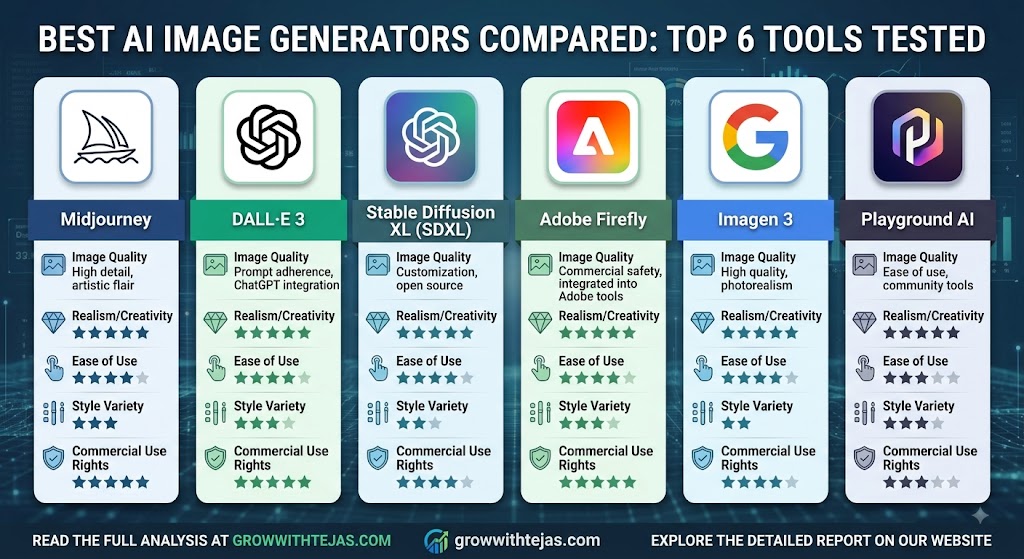
In this guide, we compare the best AI image generators in 2026, including ChatGPT, Midjourney, Adobe Firefly, Ideogram, Leonardo AI, and Google Gemini, to help you decide which platform fits your needs.
Best AI Image Generators Compared at a Glance
| AI Image Generator | Best For | Ease of Use | Image Editing | Ideal Users |
|---|---|---|---|---|
| ChatGPT | All-round image generation and editing | Excellent | Excellent | Beginners, marketers, creators |
| Midjourney | Artistic and visually striking images | Good | Good | Designers, artists, creators |
| Adobe Firefly | Commercial design workflows | Excellent | Excellent | Designers and businesses |
| Ideogram | Images containing text | Excellent | Good | Marketers and social media creators |
| Leonardo AI | Creative control and asset generation | Good | Excellent | Designers, game creators |
| Google Gemini | Convenient conversational image creation | Excellent | Good | Everyday users and Google users |
Features and plan availability can change, so check each platform’s current offering before choosing a paid plan.
1. ChatGPT – Best Overall AI Image Generator
ChatGPT has become one of the most convenient options for people who want to generate and edit images through natural-language instructions.
Instead of learning complicated settings, you can simply describe what you want.
For example:
“Create a realistic product photograph of a black smartwatch on a marble desk with soft studio lighting.”
You can then continue the conversation with instructions such as:
“Make the background darker, move the watch to the left, and add more dramatic lighting.”
This conversational workflow makes image creation particularly accessible.
What ChatGPT Is Best At
ChatGPT is useful for:
- Blog featured images
- Product concepts
- Social media graphics
- Marketing creatives
- Illustrations
- Posters
- Thumbnails
- Image transformations
- Editing existing images
The biggest advantage is the ability to iterate conversationally. You don’t necessarily have to rewrite an entire prompt whenever you want something changed.
Pros
- Beginner-friendly interface
- Strong prompt understanding
- Generates many different visual styles
- Useful image-editing capabilities
- Convenient conversational workflow
- Good option for marketers and content creators
Cons
- Usage limits can depend on your plan
- Very precise professional design work may still require dedicated design software
- Results can occasionally require several iterations
Best For
Bloggers, marketers, entrepreneurs, content creators, and everyday users who want an easy all-in-one AI image workflow.
2. Midjourney – Best for Artistic AI Images
Midjourney has built a strong reputation for producing visually impressive AI-generated artwork.
It is particularly good when you want images that immediately feel cinematic, artistic, atmospheric, or highly stylized.
Midjourney can work well for:
- Fantasy artwork
- Concept art
- Character designs
- Architecture concepts
- Fashion concepts
- Cinematic scenes
- Editorial-style images
- Creative advertising
One of its biggest strengths is visual aesthetics. Even relatively simple prompts can produce polished-looking results.
Pros
- Excellent artistic quality
- Strong visual styles
- Great lighting and composition
- Excellent for concept art
- Large creator community
Cons
- Can require practice to master
- Less straightforward than some conversational alternatives
- Getting extremely specific results may require prompt experimentation
Best For
Artists, designers and creators who prioritize visual style and creative image quality.
3. Adobe Firefly – Best for Designers and Commercial Workflows
Adobe Firefly is particularly interesting for professionals already working within Adobe’s creative ecosystem.
Rather than functioning only as a standalone text-to-image generator, Firefly’s AI capabilities are integrated into Adobe creative workflows.
That makes it useful when AI generation is only one stage of your overall design process.
Designers can use generative features for tasks such as adding, removing, replacing, or extending visual elements.
Why Adobe Firefly Stands Out
Adobe’s biggest advantage is workflow integration.
A designer might generate an idea using AI and then continue refining the visual using traditional editing and design tools.
This makes Firefly attractive for professional creative teams.
Pros
- Strong integration with Adobe creative products
- Useful generative editing features
- Built with professional creative workflows in mind
- Beginner-friendly generation experience
- Useful for marketing and design teams
Cons
- Some capabilities require paid Adobe plans or generative credits
- May be unnecessary if you don’t use Adobe products
- Pure AI-art enthusiasts may prefer platforms focused entirely on generation
Best For
Graphic designers, creative agencies, marketers, photographers, and businesses already using Adobe products.
4. Ideogram – Best AI Image Generator for Text
Generating readable text inside AI images has historically been difficult.
You might request a poster saying:
“GRAND OPENING”
…and receive something closer to random letters.
Ideogram became popular partly because of its ability to handle typography and text inside generated visuals.
That makes it especially useful for:
- Posters
- Advertisements
- Social media graphics
- Logos and logo concepts
- T-shirt concepts
- YouTube thumbnails
- Promotional graphics
Pros
- Strong text rendering
- Easy to use
- Excellent for posters and graphics
- Useful for marketing content
- Good range of creative styles
Cons
- Results still need to be checked carefully for spelling and layout
- Other platforms may perform better for certain photorealistic or artistic use cases
- Professional typography may still need manual refinement
Best For
Marketers, social media creators, small businesses, and anyone generating images where readable text is important.
5. Leonardo AI – Best for Creative Control
Leonardo AI is a strong option for users who want more control over their AI-generated assets.
It has become popular among designers, game developers, digital artists, and creators because it combines image generation with additional creative tools.
It can be useful for generating:
- Game assets
- Characters
- Environments
- Product concepts
- Marketing visuals
- Illustrations
- Concept art
Leonardo’s broader creative toolkit makes it attractive to people who want to experiment rather than simply enter a prompt and accept the first result.
Pros
- Strong creative controls
- Multiple generation options
- Useful image-editing tools
- Good for concept art
- Suitable for game and asset creation
Cons
- More options can mean a steeper learning curve
- Credit or token systems may feel complicated to new users
- Casual users may not need all of its advanced controls
Best For
Digital artists, game developers, designers, and advanced AI-image users.
6. Google Gemini – Best for Convenient AI Image Creation
Google Gemini makes AI image generation accessible through a conversational AI interface.
Like ChatGPT, the experience is straightforward: describe an image and refine your request through additional instructions.
Its integration with Google’s broader AI ecosystem makes Gemini particularly convenient for people who already use Google products.
Pros
- Easy conversational interface
- Beginner friendly
- Convenient for quick image creation
- Backed by Google’s AI ecosystem
- Useful for brainstorming visual ideas
Cons
- Advanced creators may want more granular controls
- Feature availability can vary by model, region, and plan
- Specialized image platforms may provide more creator-focused options
Best For
Everyday users, students, marketers, and people already using Google’s AI tools.
Which AI Image Generator Is Best?
There isn’t one AI image generator that wins every category.
The best choice depends on what you’re trying to create.
| Your Requirement | Recommended Tool |
|---|---|
| Best overall experience | ChatGPT |
| Artistic images | Midjourney |
| Professional design workflow | Adobe Firefly |
| Text inside AI images | Ideogram |
| Advanced creative controls | Leonardo AI |
| Convenient Google ecosystem option | Gemini |
For many beginners, ChatGPT is one of the easiest places to start because image generation and iterative editing can happen through normal conversation.
Creators focused primarily on artistic aesthetics may prefer Midjourney, while professional Adobe users may find Firefly fits naturally into their existing workflow.
How to Choose the Best AI Image Generator
Before paying for an AI image generator, consider these factors.
1. Image Quality
Don’t judge a platform from one viral example.
Test it with the types of images you actually plan to create, such as product photography, illustrations, people, advertisements, or thumbnails.
2. Prompt Understanding
A good AI image generator should understand detailed instructions without forcing you to constantly rewrite your prompt.
Conversational editing can be particularly useful here.
3. Editing Capabilities
Generating an image is only half the job.
Look for features that let you:
- Remove objects
- Replace backgrounds
- Change specific elements
- Expand images
- Adjust styles
- Modify existing images
Good editing tools can save far more time than generation alone.
4. Text Generation
If you’re making posters, thumbnails, advertisements, or social media graphics, test how accurately the tool produces written text.
Even with improved AI models, generated text should always be proofread before publication.
5. Commercial Usage Rights
This is especially important for businesses.
Before using an AI-generated image for advertising, merchandise, client work, or other commercial purposes, review the platform’s latest terms and licensing conditions.
6. Pricing
Don’t automatically choose the cheapest AI image generator.
Consider how many images you’ll actually create and whether the tool can replace other parts of your workflow.
A slightly more expensive platform may offer better value if it saves significant editing time.
Free vs Paid AI Image Generators
Many AI image platforms provide either limited free access, trials, credits, or paid subscription tiers.
Free options are useful when you’re experimenting with AI image generation.
However, paid plans can become worthwhile when you need:
- Higher usage limits
- Faster generation
- Better workflow features
- Advanced editing
- Professional features
- Regular commercial use
If you’re new to AI image generation, avoid subscribing to several platforms immediately.
Try one or two tools first and compare them using the same prompts.
That will give you a much better idea of which platform actually fits your workflow.
A Simple Way to Compare AI Image Generators Yourself
Here’s a useful experiment.
Give every AI image generator the same prompt:
“Create a photorealistic advertisement for a premium black coffee mug sitting on a wooden desk beside a laptop, warm morning sunlight coming through a window, minimalist workspace, professional commercial photography.”
Then compare:
- Prompt accuracy
- Realism
- Lighting
- Composition
- Small details
- Editing flexibility
- Generation speed
- Ease of use
Next, ask each platform to make a specific change.
For example:
“Keep everything the same but change the coffee mug from black to white.”
The first image tells you how well the AI can generate.
The second test tells you how well it can follow instructions and edit.
For everyday work, the second ability can be even more valuable.
Are AI Image Generators Worth Using?
For many creators and businesses, yes.
AI image generators can dramatically reduce the time required to move from an idea to a usable visual.
A blogger can create a featured-image concept in minutes. A marketer can quickly experiment with several advertising ideas. A designer can explore different creative directions before developing the final design.
However, AI image generators shouldn’t automatically replace professional designers, illustrators, or photographers.
Think of AI as another creative tool.
The strongest workflow often combines AI generation with human judgment, editing, branding, and creative direction.
FAQs About the Best AI Image Generators
What is the best AI image generator in 2026?
There is no universal winner, but ChatGPT is a strong all-round option for conversational generation and editing. Midjourney is particularly popular for artistic visuals, while Adobe Firefly is attractive for professional Adobe-based workflows.
Which AI image generator is best for beginners?
ChatGPT, Gemini, and Ideogram are relatively easy starting points because users can create images without mastering complicated technical settings.
What is the best AI image generator for realistic images?
Several leading generators can produce convincing photorealistic results. The best choice can vary depending on the subject, prompt, model version, and desired editing workflow, so testing the same prompt across multiple platforms is worthwhile.
Which AI image generator is best for text?
Ideogram is particularly well known for generating visuals that contain typography and readable text, although all AI-generated text should still be checked manually.
What is the best AI image generator for artists?
Midjourney and Leonardo AI are strong choices for artists because they provide powerful creative possibilities and are widely used for concept art and stylized imagery.
Can I use AI-generated images commercially?
Possibly, but commercial rights vary between providers, plans, jurisdictions, and specific circumstances. Always check the latest terms of service and licensing rules of the AI platform you’re using.
Will AI image generators replace graphic designers?
AI will automate parts of visual production, but professional design involves much more than producing an image. Branding, typography, communication strategy, layout, taste, and creative direction still require significant human judgment.
Final Verdict: Best AI Image Generators Compared
AI image generators are becoming practical creative tools rather than simple technology experiments.
If you want an easy all-round platform for generating and editing images conversationally, ChatGPT is a strong starting point.
Choose Midjourney when artistic aesthetics are your priority. Consider Adobe Firefly when AI needs to fit into a professional Adobe design workflow. Try Ideogram when typography is central to your images, and consider Leonardo AI when you want deeper creative control.
The most important thing is not finding the AI tool with the longest feature list.
It’s finding the one that helps you move from idea → image → finished content with the least friction.
For bloggers, marketers, freelancers, and business owners, that’s where AI image generation can provide the biggest productivity advantage.